
 Thomas
 If you’re looking for a budget-friendly, student-ready, or casual-use laptop, the HP Chromebook 14 (2021) delivers exactly that. It’s designed for speed, simplicity, and mobility—perfect for light productivity, web browsing, video streaming, and Google Classroom.
Powered by the Intel Celeron N4000 processor, with 4GB RAM, 32GB eMMC storage, and Chrome OS, this Chromebook boots quickly, runs efficiently, and syncs effortlessly with Google apps like Gmail, Docs, and Drive. Whether you’re a student, remote worker, or streaming fan, this is a no-fuss device that gets the job done.
HP Chromebook 14
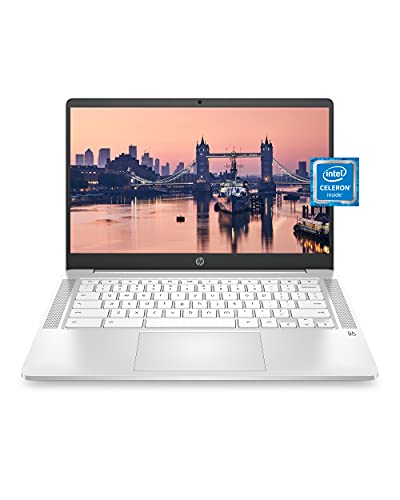
- REMOTE WORK READY – Work efficiently from the comfort of your own home office using the HP 14″ Chromebook.
- CLEAR IMAGING – Images appear crisp with the 14″ HD (1366 x 768), micro-edge, anti-glare (1) display.
- LIGHTNING FAST PROCESSING – Games, music, and binge watching are taken to new heights with Intel Celeron N4000 (2) proce…
🎯 Why I Chose the HP Chromebook 14
I needed a low-cost laptop for light use—writing emails, watching Netflix, attending video calls, and working on Google Docs. I didn’t want the complexity of Windows or Mac for such basic tasks.
The HP Chromebook 14 stood out because:
- It boots up in seconds.
- It handles multiple Chrome tabs without crashing.
- It’s light and easy to carry.
- Battery lasts most of the day.
- It’s optimized for Google apps, which I already use daily.
For under $250, it gave me everything I needed—without paying for features I didn’t.
🔍 Specs Snapshot
| Feature | HP Chromebook 14 (14a-na0021nr) |
|---|---|
| Display | 14” HD (1366×768) anti-glare |
| Processor | Intel Celeron N4000 |
| RAM | 4GB LPDDR4 |
| Storage | 32GB eMMC |
| OS | Chrome OS |
| Battery Life | Up to 13.5 hours |
| Webcam | Built-in 720p HD with dual mics |
| Weight | 3.24 lbs |
| Ports | 2x USB-C, 1x USB-A, microSD, audio |
| Wireless | Wi-Fi 5, Bluetooth 5.0 |
🧪 Real-World Use: What to Expect
⚡ Startup & Speed
Boot time is under 10 seconds. Web apps open fast. It’s ideal for Google Drive, Gmail, Docs, Zoom, and YouTube.
🎥 Video Calls
The webcam quality is decent (720p), and dual microphones help reduce background noise. For school or casual meetings, it’s great.
📶 Connectivity & Ports
Plenty of modern ports: 2 USB-C (charging + data), 1 USB-A, and a microSD card slot. Wi-Fi and Bluetooth are fast and stable.
🔋 Battery Life
Lasted 10 to 12 hours on typical use (Docs, Chrome, streaming). You can confidently leave the charger at home for the day.
🎧 Sound & Media
Speakers are okay for YouTube and Zoom. For better clarity, use headphones. Screen brightness is modest but fine indoors.
✅ Pros & ❌ Cons
✅ Pros
- Lightweight and slim – easy to carry
- Fast startup and performance for web-based tasks
- Excellent battery life
- Perfect for Google Classroom and online learning
- Quiet operation – no fan noise
- Affordable entry-level price
❌ Cons
- Low internal storage (32GB eMMC)
- No touchscreen or backlit keyboard
- Basic display – not full HD
🧑🏫 Who Should Buy This Chromebook?
- Students (K-12 and college): Ideal for Google Classroom, Docs, Sheets, and video calls
- Remote workers with simple needs: email, web, Zoom
- Seniors or tech newbies who want a plug-and-play laptop
- Travelers needing a lightweight, secure backup device
- Families wanting an extra computer for kids or guests
📊 Comparison Table
| Feature | HP Chromebook 14 | Lenovo Chromebook Flex 3 | ASUS Chromebook C223 |
|---|---|---|---|
| Display | 14″ HD | 11.6″ Touchscreen | 11.6″ HD |
| Processor | Intel Celeron N4000 | MediaTek MT8183 | Intel Celeron N3350 |
| RAM | 4GB | 4GB | 4GB |
| Storage | 32GB eMMC | 64GB eMMC | 32GB eMMC |
| OS | Chrome OS | Chrome OS | Chrome OS |
| Battery Life | 13+ hours | 10 hours | 10 hours |
| Keyboard | Non-backlit | Non-backlit | Non-backlit |
| Best For | Home & school use | Kids & casual browsing | Budget portability |
❓ FAQ – HP Chromebook 14
Q: Can I run Microsoft Word on this Chromebook?
A: Yes, via the online version of Office 365 or Android app (limited offline functionality).
Q: Can I install software like Photoshop or Zoom?
A: Not the full desktop versions. Use web/Android versions instead (Zoom, Google Photos, Canva, etc.).
Q: Can it run without internet?
A: Yes, for some apps like Google Docs (if offline mode is enabled). But it’s optimized for online use.
Q: Is this good for gaming?
A: It can run Android-based casual games, but not for high-end PC or Steam games.
HP Chromebook 14
💬 Final Thoughts — Is the HP Chromebook 14 Worth It?
If you want a basic, affordable, and reliable Chromebook that gets the job done—especially for students, Zoom calls, and web productivity—the HP Chromebook 14 is a smart buy. HP Chromebook 14.
You’re not getting advanced features or powerhouse specs—but you’re getting speed, battery life, and Google integration that just works. HP Chromebook 14.
It’s ideal for:
- Kids
- Remote learners
- Writers or bloggers
- Anyone looking for a cheap second laptop
For under $250, it’s one of the most user-friendly laptops in the Chrome ecosystem.
🔗 Add Your Affiliate Links Here:
👉 Check current price & reviews for the HP Chromebook 14 on Amazon
👉 Read our guide: Best Budget Chromebooks for Students